 naymo
naymohello@yourdomain → your real inbox.
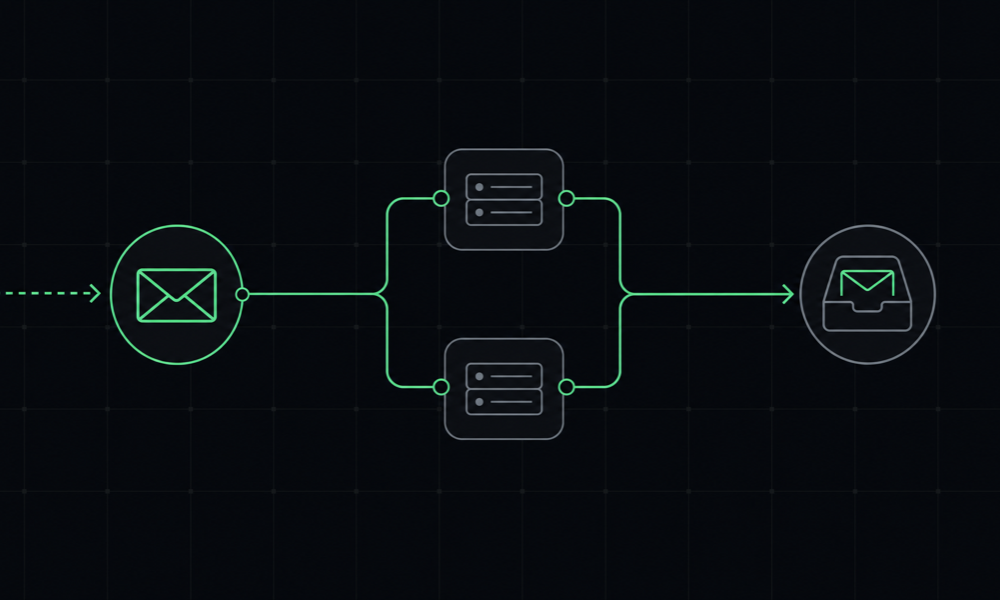
Professional email on your domain without running a mail server. Add two MX records, works on any registrar with no nameserver change, and mail lands in the inbox you already use.
Included in Pro · works with any registrar · 30-day money-back
Replaces ImprovMX / Forward Email ($9/mo) — included in naymo Pro ($19/mo)

What is email forwarding?
Email forwarding gives you a professional address on your own domain — like hello@yourname.com — that simply passes every message through to an inbox you already use, such as your Gmail. You send and read mail where you always have; the only thing that changes is that your domain now has a real, branded email address in front of it.
The big advantage is that you don't have to run or pay for a full mailbox. There's no mail server to maintain, no new inbox to check, and no monthly per-seat cost. Naymo's forwarding works on any registrar because it uses MX records only — so it doesn't matter where your domain lives or who hosts its DNS.
In plain language
MX records are the part of your domain's settings that tell the internet where your email should be delivered. To set up forwarding, you add the two MX records Naymo shows you at your DNS provider — no nameserver change. From then on, anything sent to your domain address is routed to Naymo and forwarded straight into your existing inbox.
Who it's for
- Founders and freelancers who want a professional address without a mailbox bill
- Anyone already running their bio or site on a custom domain
- People who want hello@ or support@ to land in the Gmail they already use
- Operators who'd like an AI agent to set up the forwards over MCP
What you get
Any address on your domain
Forward hello@, you@, support@ — any address on your domain — straight to the inbox you already check every day.
Works on any registrar
Forwarding runs on MX records only, so it works no matter where your domain is registered or who hosts its DNS.
No mailbox to run
You get professional email on your domain without standing up or paying for a full mail server or mailbox to maintain.
Manage from dashboard + MCP
Add and edit forwards in the dashboard, or let an AI agent set them up over Naymo's MCP server.
Pairs with your custom domain
Already running your bio and links on your own domain? Add matching email forwarding so your whole brand lives on one domain.
Everything included, line by line
Each capability in one sentence — all of it on your own domain, on a single naymo plan.
- Any address on your domain
- Forward hello@, you@, support@, or any name you like.
- Forwards to your real inbox
- Messages land where you already read mail — no new inbox.
- Works on any registrar
- MX-only setup means it works wherever your domain lives.
- No mail server to run
- Professional email without standing up or paying for a mailbox.
- No nameserver change
- Add two MX records; your existing DNS keeps working.
- Dashboard management
- Add, edit, and remove forwards from one place.
- Agent-ready over MCP
- An AI agent or script can configure forwards for you.
- Pairs with custom domains
- Match your bio and links so the whole brand is one domain.
Live in three steps
-
Add the forward
Choose the address and where it should go — local@yourdomain → your real inbox.
-
Point your MX records
Add the two MX records Naymo shows you at your DNS provider. No nameserver change required.
-
Mail lands in your inbox
Once the records resolve, anything sent to your domain address arrives in the inbox you already use.
naymo vs ImprovMX
ImprovMX and Forward Email are dedicated email-forwarding services. Here's an honest comparison for someone deciding between a standalone forwarder and getting it inside naymo.
- Monthly price Included in Pro ($19, $29 list) ≈ $9 for the paid tier
- Setup Two MX records, any registrar MX records, any registrar
- Mailbox required No — forwards only No — forwards only
- Send-as / outbound Forwarding-focused Some plans add SMTP send
- Bundled with other tools Bio, domain, SEO, analytics Email-forwarding only
- Agent / API setup MCP + REST API available
- Custom catch-all Address-level forwards Catch-all supported
- Best for Domain owners wanting one plan Forwarding-only use cases
Comparison reflects naymo Pro ($19/mo launch · $29 list) versus the competitor's comparable paid tier. Competitor capabilities and prices are approximate and may change.
$0 on domains · 0% selling fees on Pro — we sell software, not referrals. Our handoffs are neutral and unpaid, so the cheapest option is always the genuinely cheapest, and what you sell on your bio is yours to keep.
Pro
Start free. Upgrade only when you need more — see exactly what every plan includes.
Questions, answered
Do I need a mail server?
No. Forwarding gives you professional email on your domain without running or paying for a mailbox — messages are simply forwarded to an inbox you already have.
Does it work with my registrar?
Yes. Forwarding uses MX records only, so it works on any registrar and any DNS host — there's no nameserver change required.
How do I set it up?
Add the forward (local@yourdomain → your inbox), then add the two MX records Naymo shows you at your DNS provider. Once they resolve, mail starts arriving.
Can an AI agent configure it?
Yes. Naymo exposes email forwarding over its MCP server, so an agent (or your own script over the REST API) can add and manage forwards the same way you would.
Which plan is this on?
Email forwarding is available on Pro, and it pairs naturally with running your bio and links on your own custom domain. See the pricing page for details.
Can I forward several addresses on one domain?
Yes. Set up as many forwards as you need — hello@, support@, you@ — and route each one to the inbox that should receive it, all from your dashboard.
Will this affect my existing website or DNS?
No. You only add MX records, and there's no nameserver change, so your website and other DNS records keep working exactly as they do now.
Can I reply from my domain address?
Forwarding routes incoming mail to your existing inbox, where you read and reply as usual. If you want every reply to show your domain address as the sender, configure send-as in your own email client using your provider's settings.
Your whole stack, one subscription
naymo Pro bundles every tool below — on your own domain — for $19/mo, instead of paying each of these separately. Approximate published prices, for comparison.
- Linktree / Beacons Link-in-bio + selling $9–24
- Bitly / Short.io Branded short links $8–35
- Semrush / Ahrefs SEO audit + rank tracking $99–139
- Otterly / Profound AI-visibility (GEO) $29–99
- Pingdom / Better Stack Uptime monitoring $10–25
- Fathom / Plausible Privacy analytics $9–14
- ImprovMX / Forward Email Email forwarding $9
- Buttondown / Mailchimp Email broadcasts $9–20
Approximate published prices, for comparison — pick the tools you'd actually buy. naymo replaces them with one subscription, on your own domain.
Where to go next
- Set up the domain first — connect your domain to naymo, then add matching email forwarding.
- Message your audience too — capture leads on your bio and broadcast to a list you own.
- Put your brand on one domain — run your bio, links, and email all on the same custom domain.
Curious what you're overpaying today? Run the free domain renewal Overpay Audit to see your yearly savings, or compare every plan on the naymo pricing page.
Better together
Every tool runs on the same domain and the same Pro plan — add these next.
hello@yourdomain → your real inbox.
Professional email on your domain without running a mail server. Add two MX records, works on any registrar with no nameserver change, and mail lands in the inbox you already use.