 naymo
naymoYour bio and links, on your own domain.
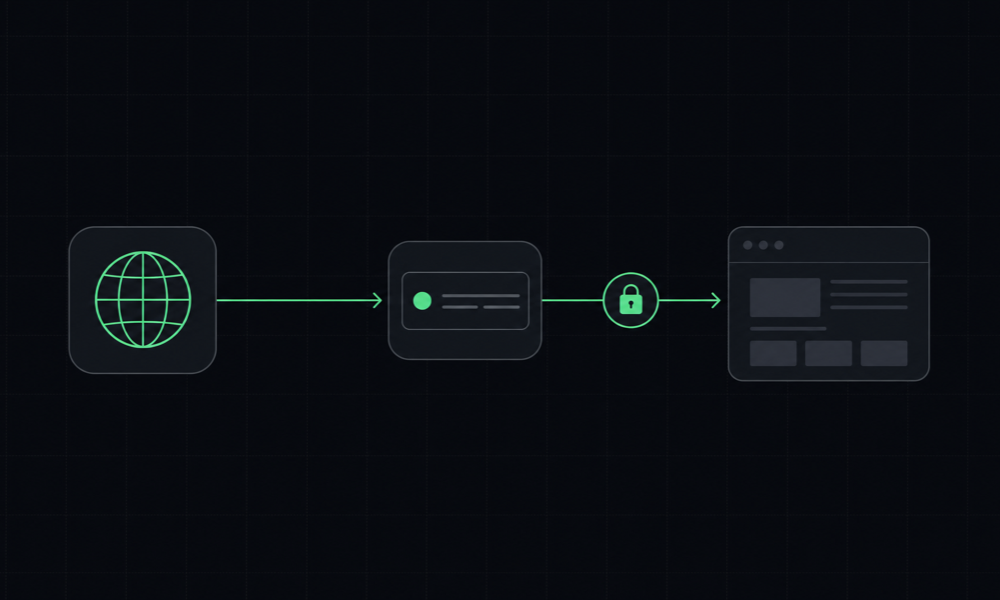
Point any domain at your page with one CNAME — no nameserver change. Automatic HTTPS, and an AI agent can even set the DNS for you over Naymo's MCP tools.
Included in Pro · works with any registrar · 30-day money-back

What does connecting a custom domain mean?
A custom domain is your own web address — yourname.com — instead of a shared one like naymo.ai/@you. Connecting it means your Naymo bio page and short links load at your domain, so everything you share looks professional and fully on-brand. Visitors see your name in the address bar, not a platform's.
The part that usually scares people — DNS — is the easy part here. You don't move your nameservers or migrate anything. You add one CNAME record at whatever registrar your domain already lives at, Naymo issues and renews the SSL certificate for you automatically, and your site is live over HTTPS in minutes.
In plain language
DNS is just the internet's address book: it tells browsers where yourname.com should point. A CNAME record is one line in that address book that says 'send this domain to Naymo.' That's the only change you make. Because you're not delegating nameservers, your email, other subdomains, and existing setup keep working exactly as they do today.
Who it's for
- Creators and businesses who want their bio and links on their own domain
- Anyone who already owns a domain and wants to use it without building a website
- People nervous about DNS who want a one-record, no-nameserver-change setup
- Operators who want an AI agent to handle the DNS for them over MCP
What you get
Any domain, any registrar
Bring a domain you already own from any registrar. Naymo doesn't sell you the domain — point the one you've got at your page.
Automatic HTTPS
SSL is issued and renewed for you via Cloudflare for SaaS. Your site is served over HTTPS with no certificates to manage.
Bio + short links on your brand
Your link-in-bio page and your short links both live on your own domain, so every URL you share looks like you — not a platform.
An agent can add the DNS
Over Naymo's MCP tools, an AI agent can set the CNAME on supported registrars — so connecting a domain can be hands-off.
No nameserver change needed
Add a single CNAME record and you're done. You don't have to move your nameservers or migrate DNS away from where it lives now.
Live in minutes
Once the CNAME resolves, your domain goes live with HTTPS in minutes — no waiting days for a full nameserver delegation.
Everything included, line by line
Each capability in one sentence — all of it on your own domain, on a single naymo plan.
- Bring any domain
- Use a domain from any registrar — Naymo earns nothing on domains.
- Single CNAME setup
- Add one record; no nameserver delegation or DNS migration.
- Automatic HTTPS / SSL
- Certificates are issued and renewed for you via Cloudflare for SaaS.
- Bio on your domain
- Your link-in-bio page serves from your own address.
- Short links on your domain
- Branded short links run on short.yourdomain.com too.
- Live in minutes
- Once the CNAME resolves, the domain goes live — no multi-day wait.
- Agent can set the DNS
- On supported registrars, an AI agent adds the CNAME over MCP.
- Pairs with email forwarding
- Add hello@yourdomain forwarding so your whole brand is one domain.
Live in three steps
-
Add your domain
Enter the domain you want to use in your dashboard. Use any domain you already own, from any registrar.
-
Add the CNAME we show you
Naymo gives you one CNAME record. Add it at your DNS provider — no nameserver change required.
-
Live with HTTPS in minutes
Once the record resolves, your bio and links serve from your domain over HTTPS, with SSL handled for you.
naymo vs a typical website builder
Most platforms either charge extra for a custom domain or make you delegate nameservers. Here's how naymo's approach compares to a typical website-builder custom-domain flow.
- Where you buy the domain Any registrar — keep your own Often pushed to buy theirs
- DNS change required One CNAME record Frequently full nameserver change
- HTTPS / SSL Automatic, renewed for you Usually automatic too
- Cost of the domain feature Included in Pro Often a paid upgrade
- Affiliate incentive on domains None — $0 earned on domains Sometimes resells domains
- Time to go live Minutes after CNAME resolves Minutes to days
- Agent can configure DNS Yes, on supported registrars No
- Full website hosting Bio + links, not a full CMS Full site builder
Comparison reflects naymo Pro ($19/mo launch · $29 list) versus the competitor's comparable paid tier. Competitor capabilities and prices are approximate and may change.
$0 on domains · 0% selling fees on Pro — we sell software, not referrals. Our handoffs are neutral and unpaid, so the cheapest option is always the genuinely cheapest, and what you sell on your bio is yours to keep.
Pro
Start free. Upgrade only when you need more — see exactly what every plan includes.
Questions, answered
Do I have to buy the domain from Naymo?
No. Bring a domain you already own from any registrar. Naymo earns nothing on domains — you just point the one you have at your page.
Do I need to change my nameservers?
No. You only add a single CNAME record at your current DNS provider. There's no nameserver delegation and no DNS migration.
What about HTTPS / SSL?
It's automatic. SSL is issued and renewed for you through Cloudflare for SaaS, so your domain is served over HTTPS without you managing any certificates.
How long does it take to go live?
Usually minutes. Once the CNAME record resolves, your domain goes live with HTTPS — no multi-day wait like a full nameserver change.
Can an AI agent set the DNS for me?
Yes, on supported registrars. Over Naymo's MCP tools, an agent can add the required CNAME record, so connecting a custom domain can be done for you end to end.
Will connecting my domain break my existing email or website?
No. Because you only add one CNAME record and don't change nameservers, your email (MX records), other subdomains, and any existing site keep working exactly as they do now.
What is a CNAME record, in plain terms?
It's a single line in your domain's settings that says 'send this address to Naymo.' You copy the value Naymo shows you into your registrar's DNS panel, save, and that's the whole change.
Can I use a subdomain like links.mysite.com?
Yes. You can connect a subdomain instead of your root domain, which is handy if your main site already lives elsewhere and you just want your bio or short links on a branded address.
Your whole stack, one subscription
naymo Pro bundles every tool below — on your own domain — for $19/mo, instead of paying each of these separately. Approximate published prices, for comparison.
- Linktree / Beacons Link-in-bio + selling $9–24
- Bitly / Short.io Branded short links $8–35
- Semrush / Ahrefs SEO audit + rank tracking $99–139
- Otterly / Profound AI-visibility (GEO) $29–99
- Pingdom / Better Stack Uptime monitoring $10–25
- Fathom / Plausible Privacy analytics $9–14
- ImprovMX / Forward Email Email forwarding $9
- Buttondown / Mailchimp Email broadcasts $9–20
Approximate published prices, for comparison — pick the tools you'd actually buy. naymo replaces them with one subscription, on your own domain.
Where to go next
- Build the bio page first — create your link-in-bio page, then point your domain at it.
- Add email on your domain — forward hello@yourdomain to your real inbox with two MX records.
- Brand your short links too — serve short links from short.yourdomain.com on the same domain.
Curious what you're overpaying today? Run the free domain renewal Overpay Audit to see your yearly savings, or compare every plan on the naymo pricing page.
Better together
Every tool runs on the same domain and the same Pro plan — add these next.
Your bio and links, on your own domain.
Point any domain at your page with one CNAME — no nameserver change. Automatic HTTPS, and an AI agent can even set the DNS for you over Naymo's MCP tools.